Kitting is the process that converts a bulk production run into a managed site-by-site deployment. Instead of shipping 500 identical boxes of mixed materials to a regional warehouse and hoping the on-site teams sort it out, kitting means assembling 500 individual packs each containing exactly the right items for one specific location, labelled, checked and packed in installation sequence.
We kit materials as a standard part of every retail rollout programme we deliver. This guide explains the kitting process, why it has such a measurable impact on installation quality, and how it is organised for programmes ranging from 20 sites to 500.
Key takeaways
- Kitting assembles site-specific packs from bulk production output, ensuring every location receives exactly the items specified for its unique dimensions and configuration
- Kitted programmes report approximately 80% fewer on-site queries and near-zero instances of wrong materials at wrong locations
- Each kit is assembled against a site-specific pick list derived from survey data, verified against a checklist and photographed before sealing
- Packing in installation sequence (large items first, finishing materials last) reduces installation time and prevents damage from unnecessary handling
- Kit labelling with site name, address, contents list and unique reference number enables tracking from warehouse to installation completion
- Buffer stock for common items (spare vinyl, replacement small components) is included in a percentage of kits to handle on-site damage without requiring emergency reprints
Why Kitting Exists: The Problem It Solves
On a 200-site rollout, the production output might include 200 fascia graphics (each a different width), 200 window vinyl sets (varying window configurations), 400 internal wall panels (varying wall dimensions), 200 counter graphics, and assorted shelf-edge strips, floor decals and promotional materials. That is approximately 1,200 individual items that must reach the correct site.
Without kitting, these items are produced, stacked on pallets by type, and shipped to a distribution centre. The installation team for Site 47 arrives at the DC, locates the correct fascia graphic from a pallet of 200 fascia graphics, finds the right window set from a separate pallet, selects the correct wall panels from a third pallet, and so on. Mistakes are inevitable wrong dimensions pulled, items missed, graphics for Site 47 mixed with graphics for Site 74. The installation team spends an hour sorting instead of five minutes unpacking.
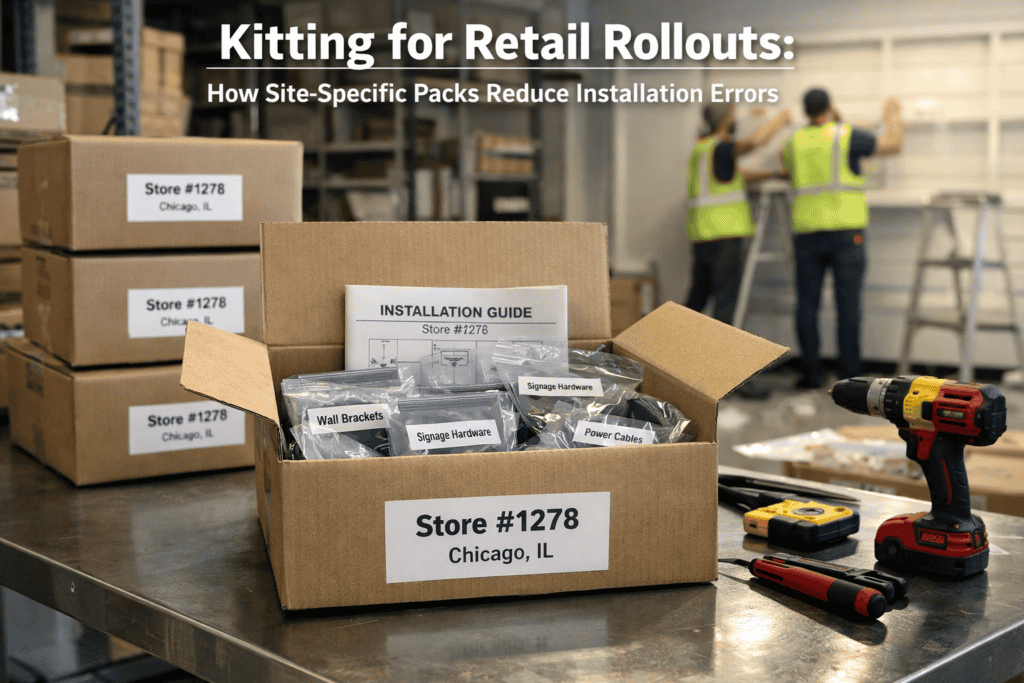
With kitting, the installation team for Site 47 receives one labelled box containing every item for that site, packed in installation order, with a contents list and installation guide. They unpack, verify the contents against the list, and start installing. The sorting, checking and allocation happened in the warehouse under controlled conditions, not on a shop floor under time pressure.
The Kitting Process: Step by Step
Step 1: Generate site-specific pick lists. After production is complete, the site survey data is used to generate a pick list for each location. The pick list details every item for that site: product description, dimensions, substrate, quantity, and a reference photograph or artwork thumbnail for visual verification.
Step 2: Set up the kitting area. Produced materials are organised by type in the warehouse kitting zone all fascia graphics in one bay, all window vinyls in another, all wall panels in a third. Each item is labelled with the site name or number during or immediately after production. The kitting zone is laid out so that the packing team can move through the bays sequentially, picking items for each site in a logical flow.
Step 3: Pick and assemble. Working from the pick list, the packing team collects each item for a specific site. Every item is checked against the pick list for correct site reference, correct dimensions, correct quantity and acceptable print quality. Damaged or incorrect items are flagged and replaced from production or buffer stock.
Step 4: Pack in installation sequence. Items are packed into the kit box in reverse installation order the last item to be installed goes in first (bottom of box), the first item to be installed goes in last (top of box). This means the installation team unpacks in the correct sequence without having to dig through the box to find what they need first.
For large format graphics that are rolled rather than flat-packed, rolled items are packed in a separate tube or outer box, with the tube labelled and cross-referenced to the main kit box.
Step 5: Include documentation. Each kit includes a printed installation guide (with dimensioned diagrams showing where each graphic goes), a contents list (for the installation team to verify on arrival), surface preparation instructions (if applicable), and a sign-off sheet (for post-installation photographic documentation and completion confirmation).
Step 6: Label and photograph. The sealed kit box is labelled with the site name, address, kit reference number, number of boxes in the consignment, and handling instructions. The assembled kit is photographed before sealing this photograph becomes the quality record and resolves any subsequent disputes about what was or was not included.
Handling Site-Specific Variations
The majority of multi-site programmes involve some degree of site-specific variation. Site 12 has a 4.2-metre fascia while Site 13 has a 3.8-metre fascia. Site 45 has three windows while Site 46 has two. Site 78 needs a fire-rated vinyl while Site 79 has a standard requirement. These variations are normal and are handled through the pick list system each list is unique to its site.
The challenge is accuracy. On a 200-site programme with an average of six items per kit, that is 1,200 individual item selections. An error rate of just 1% means 12 wrong items reaching sites 12 installation delays, 12 emergency reprints, 12 unhappy store managers. A professional kitting operation targets an error rate below 0.5%, achieved through standardised processes, verification checks and photographic documentation.
Buffer Stock and Contingency
On any multi-site programme, some materials will be damaged in transit, damaged during installation, or found to be incorrect due to survey data errors or site changes that occurred after the survey. Planning for this is cheaper than reacting to it.
We hold buffer stock in the warehouse for every rollout programme typically 5-10% of the total production volume for high-risk items (window vinyl, which is easily creased in transit) and 2-5% for low-risk items (rigid panels, which are more robust). Buffer stock is held for the duration of the programme and can be dispatched on a next-day basis to any site that reports damage or missing items.
For larger programmes, we include a contingency kit for each installation team a small pack of common spares (spare vinyl, squeegees, cleaning solution, cable ties, spare fixings) that allows minor on-site problems to be resolved without waiting for a replacement delivery.
Logistics: From Warehouse to Site
Kitted boxes are dispatched via courier (for small, lightweight kits), pallet network (for larger kits or multi-box consignments), or dedicated transport (for time-critical or fragile deliveries). The dispatch schedule is synchronised with the installation programme kits arrive one to two days before the scheduled installation date, not weeks in advance (which creates storage problems at the site) or on the installation day (which creates panic if the delivery is delayed).
Delivery is tracked with proof of delivery recorded for each consignment. The programme manager monitors the delivery status of every kit and escalates any delivery failures immediately, dispatching replacement kits from buffer stock where necessary.
If you are planning a multi-site programme that would benefit from professional kitting, discuss your rollout logistics and we will include kitting in the programme proposal.
Frequently Asked Questions
How much does kitting add to the project cost?
Kitting typically adds 5-10% to the total production and logistics cost, depending on the number of items per kit and the complexity of the pick list. This cost is offset by the reduction in on-site installation time, fewer error-related reprints, and the elimination of regional sorting and redistribution costs that would be required without kitting.
Can kitting handle items from multiple suppliers?
Yes. If the programme includes items produced by different suppliers (for example, printed graphics from us and hardware fixtures from a third party), all items can be consolidated in our warehouse and kitted together into site-specific packs. The key requirement is that all items arrive at the warehouse before the kitting deadline.
What if a site’s requirements change after kitting?
If the change is minor (a dimension adjustment, an additional item), the kit can be opened, modified and re-sealed. If the change is significant (a completely different graphic scheme), a new kit is assembled from production or buffer stock. The earlier changes are communicated, the less disruptive they are to the programme schedule.
How far in advance of installation should kits be dispatched?
One to two working days before the scheduled installation date is standard. This provides a delivery buffer without creating long-term storage issues at the site. For sites with restricted delivery windows or complex access arrangements, the dispatch schedule is adjusted to ensure arrival within the required window.
Do you provide installation guides in each kit?
Yes. Every kit includes a printed installation guide with dimensioned layout diagrams, surface preparation instructions, and a sign-off sheet. For complex installations, we can also provide video guides accessible via a QR code printed on the guide.
Can we track the status of individual kits?
Yes. We provide a live programme tracker showing the status of every site: in production, kitted, dispatched, delivered, installed, signed off. The client and the programme manager have access to the same dashboard, providing a single real-time view of programme progress.